Choose inventory units and package settings
Configure quantity, sell individual units, and understand automatic package calculation when linking is on or off.
Reviewed against current application source. Screenshots use fictional local training data.
What you will learn
#Inventory quantity is expressed in the item’s Unit. Packages are a second counter. Quantity per package describes the package size; Link quantity and packages determines whether the counters are linked. Purchase conversion describes supplier invoice units and can use a different factor. Decide these meanings before entering opening stock.
- Distinguish quantity, packages and purchase units.
- Interpret linked and independent counters.
- Review the resulting amount before approving a change.
Before you start
#You need inventory edit permission to configure a product. Confirm the actual label and package presentation with the Inventory Lead. Review existing stock, lots, locations and pending usage before changing established settings.
Use a training item for practice. Changing a package setting can change how future entries are interpreted; it is not a substitute for recording a receipt or correcting historical movements.
How do I configure quantity if I do not sell by package?
#Choose the inventory Unit according to how you count or dispense: Count for individual tablets, syringes or pieces, or mL for measured liquid. Write the presentation in the Name so staff can identify what one unit means. Selling individual units does not require turning package linking off.
If you buy boxes of 10 but dispense individual tablets, use Count and Quantity per package = 10. Keep linking on if packages represent equivalents of that same stock. Dispensing 3 tablets from 25 leaves 22 tablets and 2.2 package equivalents; it does not require a whole-box sale.
If you only count loose units and have no useful package counter, use quantity entries and leave the independent package counter unused. Do not invent a package size. For a new item you can enter opening balances; saved item balances are reviewed through Adjust and History.
What are automatically calculated packages?
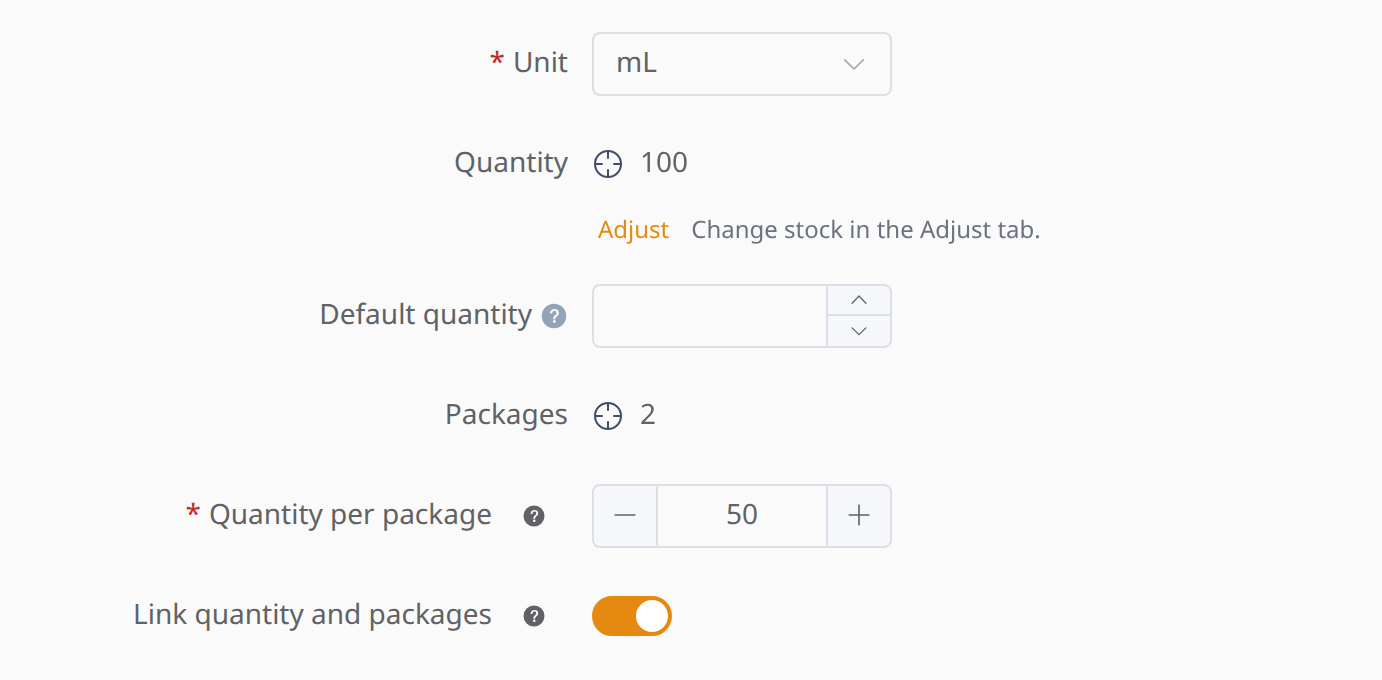
#The control is called Link quantity and packages. With linking on and a positive Quantity per package, Übik calculates both directions: quantity = packages × package size; packages = quantity ÷ package size. This controls stock arithmetic, not whether you may sell a single unit.
For linked mixed entries, 2 packages of 10 plus 5 loose units means 25 units. Enter the loose amount only once. The calculator below practices linked stock only; it does not model independent counters.
What happens if automatic package calculation is off?
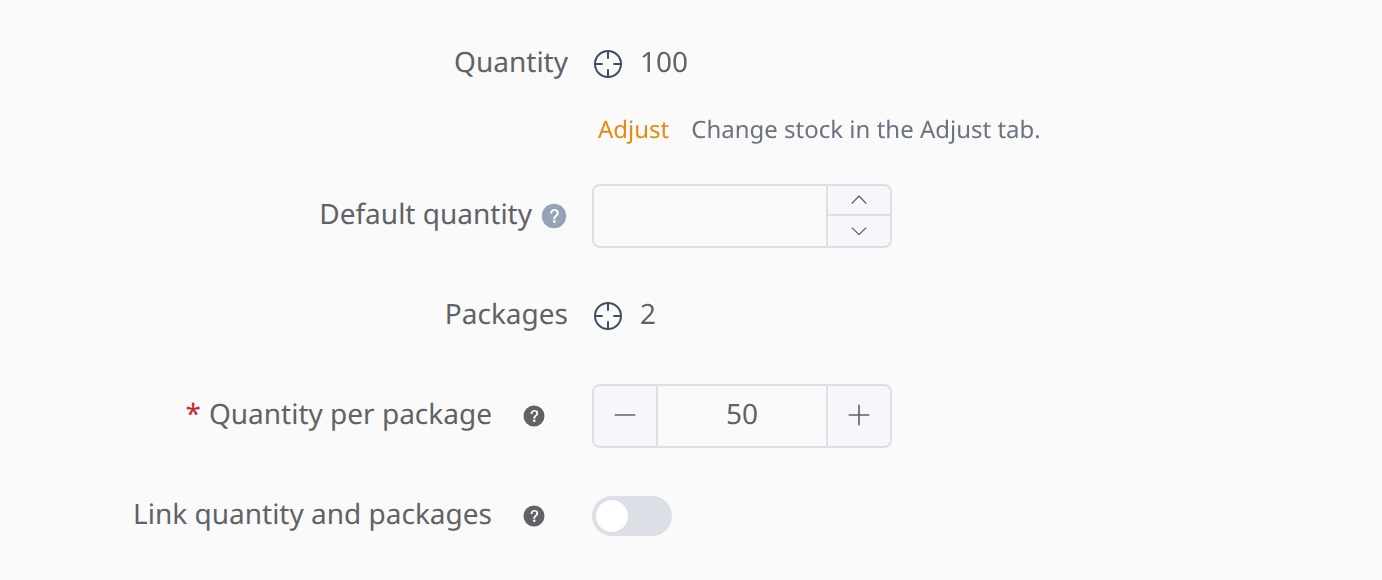
#With linking off, quantity and packages are independent counters. A quantity-only movement changes quantity; a packages-only movement changes packages. Entering both records both amounts independently: 5 quantity and 2 packages does not automatically add 25 units, even if Quantity per package says 10.
Use independent counters only when staff have agreed what each physical balance represents. Do not record the same stock twice as loose quantity and unopened packages. Turning linking off does not unpack stock, recount it or repair an old discrepancy. Review the physical count, pending dispenses and History with the Inventory Lead before changing an established setup.
Do it in Übik
#- Open Inventory → Manage, search for the item and choose Edit.
- Set Unit to the smallest practical amount you count or dispense. Choose Count for whole tablets or pieces; mL for liquid measured in mL. Package is a separate Unit choice for stock genuinely counted as whole packages.
- Review Quantity per package. A box of 10 tablets has size 10 when a package represents that box.
- Review Link quantity and packages. With linking enabled and a valid size, quantity and package equivalents follow the configured relationship. Independent counters remain separate.
- Review Purchase conversion separately. A supplier case containing several boxes can represent more units than one package.
- Save the configuration and reopen it to confirm. Use Adjust or the appropriate receipt/dispense workflow for stock movements; inspect the preview before approving.
Work through a clinic example
#A fictional tablet item uses Unit = Count and 10 tablets per package. With linking enabled, 25 tablets correspond to 2.5 package equivalents. Two packages plus five loose tablets mean 25 tablets, not 27. A package equivalent does not prove there are 2.5 unopened boxes.
If the supplier invoices a case of five boxes, one case contains 50 tablets. Purchase conversion is therefore 50 for that presentation while Quantity per package remains 10. Neither field should be copied into the other automatically.
Change the numbers and check the result
Practice only · fictional examples. Does not change records or approve movements or payments. This simplified calculation excludes taxes, other movements and location allocations.
Common mistakes
#- Using “box” as the count unit while clinical staff dispense individual tablets without a defined conversion.
- Treating 2 packages plus 5 loose tablets as 7 tablets.
- Changing package settings to force a current balance to match instead of investigating the movements.
Troubleshooting and recovery
#If package entry is unavailable, check linking and a positive Quantity per package. Reopen a staged stock review if the setup changed. Do not guess a conversion to bypass a warning.
For an existing mismatch, review History and pending dispenses with the Inventory Lead. Some actions correct linked package equivalents; review the displayed explanation before saving.
Check your understanding
#Ready to use this workflow
#Saved only in this browser. This is a personal practice checklist, not a clinic training record.
Related guides
- Related workflow guide
- Find instructions, report a problem and follow a request
- Create and maintain the inventory catalog
- Public manual
Source: Choose inventory units and package settings · Revision 3