Core lessons
Choose the right clinic and portal, find a task, and return to the correct patient or product.
8 min
Core lessons
Understand personal logins, clinic permissions and how to resolve missing actions.
8 min
Core lessons
Coordinate Reception, clinical care, inventory and checkout without confusing their separate records.
8 min
Core lessons
Use the Learning Center and Help to get answers, report defects and track feature requests.
8 min
Core lessons
Follow a basic Technician workflow from the waiting patient through notes, vitals, completed services, dispensing and the Reception handoff.
15 min
Core lessons
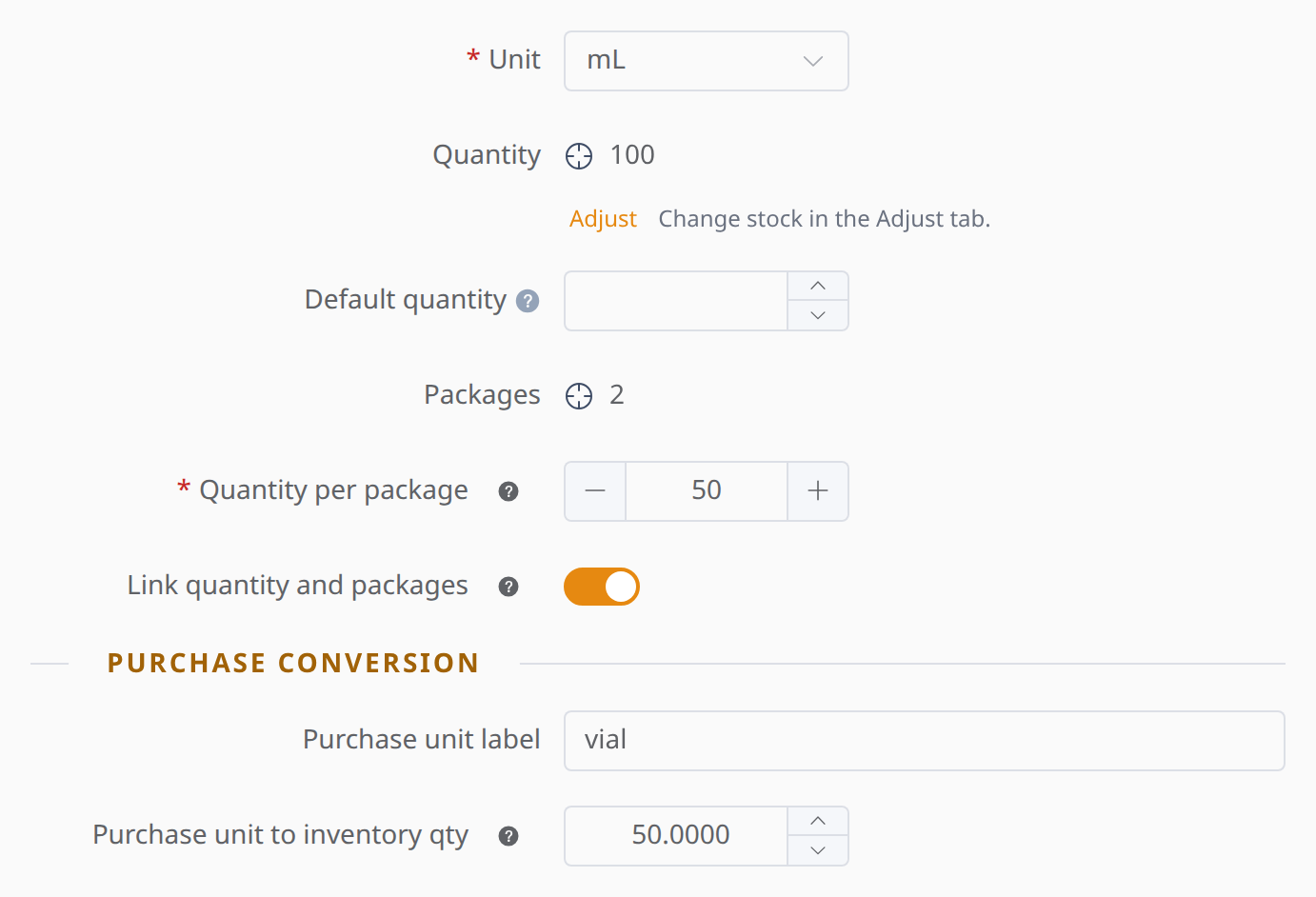
Configure quantity, sell individual units, and understand automatic package calculation when linking is on or off.
12 min
Core lessons
Create one item or prepare a bulk inventory import, then save or scan its barcode and verify the right presentation.
12 min
Core lessons
An Inventory Group is a named family of related items. A specific inventory item remains the presentation you count, purchase and dispense. Type is one of eight fixed classifications; Tags are searchable labels. Decide these separately so staff can find the intended product without duplicating records.
15 min
Core lessons
Supplier records identify who supplies an item; item supplier links make that supplier available to purchasing. Recommendations also depend on the saved item planning strategy, demand, reorder point and existing orders. Saving a supplier or adding an email address alone does not guarantee a recommendation or send an order.
15 min
Core lessons
Understand supplier-to-Übik conversion, configure purchase units, and receive the correct quantity without counting packages twice.
15 min
Core lessons
Keep invoice quantities and prices together, review discrepancies and save expenses before receiving stock.
12 min
Core lessons
Review what physically arrived, assign its lot and location, and verify the saved movement.
12 min
Core lessons
Save the inventory item first, enable lot tracking, then assign batches, expiration dates and locations without duplicating stock.
12 min
Core lessons
Trace movements, before/after balances, pending usage and count boundaries before correcting a discrepancy.
15 min
Core lessons
Understand Audit versus Add, count the correct scope and verify saved balances without repeating earlier usage.
12 min
Core lessons
Choose the right consumption workflow, review quantities and verify that stock was used once.
12 min
Core lessons
Record the actual reason stock left and distinguish a stock correction from customer credit or money.
12 min
Core lessons
Review linked products, source and destination quantities, lots and the saved transfer evidence.
12 min
Core lessons
Compare Auto, EOQ, JIT and Manual, and learn why demand, shelf life, costs and review holds matter.
15 min
Core lessons
Review suggestions, choose the right quantity basis and track supplier orders through fulfillment.
12 min
Core lessons
Find the right owner, keep contact preferences accurate, and attach each pet to the correct customer record.
12 min
Core lessons
Create the right visit for the right patient, review dates and availability, and verify the saved appointment.
12 min
Core lessons
Change the existing booking, preserve the reason and history, and review deposits separately from schedule changes.
12 min
Core lessons
Help clients complete online booking, review their required reason, and save Reception’s private handoff notes safely.
12 min
Core lessons
Identify the patient, record arrival accurately, and hand the visit to the right team without duplicating the appointment.
12 min
Core lessons
Keep a quote separate from a real visit, review weight-based pricing, and verify the deposit recorded against the intended appointment.
12 min
Core lessons
Start a product sale, select the right customer, review items and totals, record payment and verify the receipt in Reception or configured POS mode.
15 min
Core lessons
Review the visits being paid, apply the actual payment methods, and distinguish charges, recorded payments, balance, and cash change.
12 min
Core lessons
Find the original purchase, record this partial or full return, choose stock handling and separately record any actual money refund.
15 min
Core lessons
Choose the correct path for an unpaid balance, unused deposit, existing credit return, or product refund, and verify the resulting records.
12 min
Core lessons
Use the correct contact preference, prepare a complete document, and distinguish sending, signing, and communication history.
12 min
Core lessons
Keep the appointment status, patient location, assignee, and next action aligned from Waiting to checkout.
12 min
Core lessons
Capture the relevant history, findings, vitals, diagnosis, and notes, then confirm that edits have saved.
12 min
Core lessons
Review the item, inventory amount, billing mode, instructions, and printed prescription before handing it to the owner.
12 min
Core lessons
Keep sample details, analytes, units, reference ranges, source documents, and reviewed results together.
18 min
Core lessons
Describe the study, link its images, separate findings from interpretation, and review the owner report.
12 min
Core lessons
Use surgery stages, repeated intra-op reports, linked work, and a clear discharge handoff.
12 min
Core lessons
Configure stay instructions, distinguish owner supplies, record administrations and condition checks, and prepare discharge.
18 min
Core lessons
Build a clear boarding plan, record completed care, and prepare a dependable pickup handoff.
12 min
Core lessons
Connect an approved schedule to products or services, distinguish due dates from actual events, and configure reminders intentionally.
18 min
Core lessons
Review owner instructions, linked work, documents, and follow-up before handing a completed case to Reception.
12 min
Core lessons
Review clinic identity, country, time zone and enabled workflows before the team starts working.
15 min
Core lessons
Configure each person’s clinic access, default portal and permission categories, then verify the tasks they need.
15 min
Core lessons
Connect scheduling settings, staff skills, work shifts and breaks so customers see appropriate booking times.
18 min
Core lessons
Weight chooses the unit price for both; quantity multiplies it. Review boundaries, fallback and inventory package pricing.
15 min
Core lessons
Set service prices, tax-included behavior, editable-price rules and approved discounts, then review a new charge.
15 min
Core lessons
Keep invoice amounts, payment allocations and stock receipt separate while tracking what the clinic still owes.
18 min
Core lessons
Choose the exact close period, compare expected and counted cash, explain differences and review the saved close.
18 min
Core lessons
Configure the meaning of Pay Rate, resolve attendance exceptions and review the saved payroll decision.
20 min
Core lessons
Choose the right analytics area, align date ranges and trace exceptions to the records that explain them.
18 min
Core lessons
Use the correct import path, review staged records and preserve customer-pet links before opening day.
20 min
When this feature is enabled
Prepare inventory/service fiscal fields, understand supported limits and verify issuance separately from payment.
15 min
When this feature is enabled
For eligible Mexico clinics, validate fiscal data, follow the correct payment path and review failures without duplicating records.
20 min
When this feature is enabled
For clinics using home services: verify addresses, plan realistic routes, assign drivers, and send reviewed changes deliberately.
12 min
When this feature is enabled
For clinics using partnerships, review destination, urgency, patient identity, and the resulting appointment without duplicating referrals.
12 min
When this feature is enabled
Prepare membership benefits and insurance claims without confusing recurring dues, visit charges or insurer settlement.
22 min
When this feature is enabled
When AI is enabled, review proposed text, matched catalog items, quantities, and saved changes while keeping clinical ownership.
12 min
When this feature is enabled
When available, open the patient’s call, review connection controls, and confirm that captured files reached the correct chart.
12 min