Close the register and hand over the drawer
Choose the exact close period, compare expected and counted cash, explain differences and review the saved close.
Reviewed against current application source. Screenshots use fictional local training data.
What you will learn
#Register Close is a saved reconciliation for a specific drawer and time period. It compares recorded cash activity with the money physically counted and records who performed, received and verified the close. A shift handoff and an end-of-business close serve different moments but use the same need for a clear period and accountable count.
Expected cash equals starting cash plus cash payments minus cash refunds minus cash removed, plus cash added. Drawer difference is counted cash minus expected cash. Card or transfer payments do not belong in the physical cash count; applying existing customer credit is different from collecting new money.
Before you start
#Use the correct clinic and appropriate Reception or reporting/accounting access. Agree the drawer, responsible staff and start/end times. Have the previous close, cash drops, added change and refund evidence available before the count.
Use a fictional Front desk drawer for practice. For an overnight shift, write down both dates as well as times. Do not split a real overnight responsibility period merely because midnight falls in the middle.
Follow the workflow
#- Open the Reception Portal money ($) button and Register Close, or use the Register Close panel in Appointment Analytics. Select the exact Start Date, Start Time, End Date and End Time for the period being counted.
- Choose Shift handoff or End of business. Review the drawer or office, Performed by and Handoff to when responsibility changes. Check any suggested start time and starting cash against the previous completed close.
- Enter Starting drawer cash, Counted drawer cash, Cash removed/drop and Cash added/change fund from the actual count and supporting notes. Review cash payments and refunds for the same window.
- Compare expected cash and drawer difference. Review non-cash and cashier totals separately; deposits follow their real tender method, while applied Store Credit is not a new collected-payment row.
- Investigate differences through the original payment, refund or cash-movement evidence. Add a discrepancy reason, resolution status and notes, and identify Verified by when a second person reviews.
- Save a draft while investigation remains open, or complete the accepted close. Open Accounting > Register Close, select the saved row and inspect its period and detail; print it if the clinic uses a paper handoff packet.
Practice with a fictional clinic
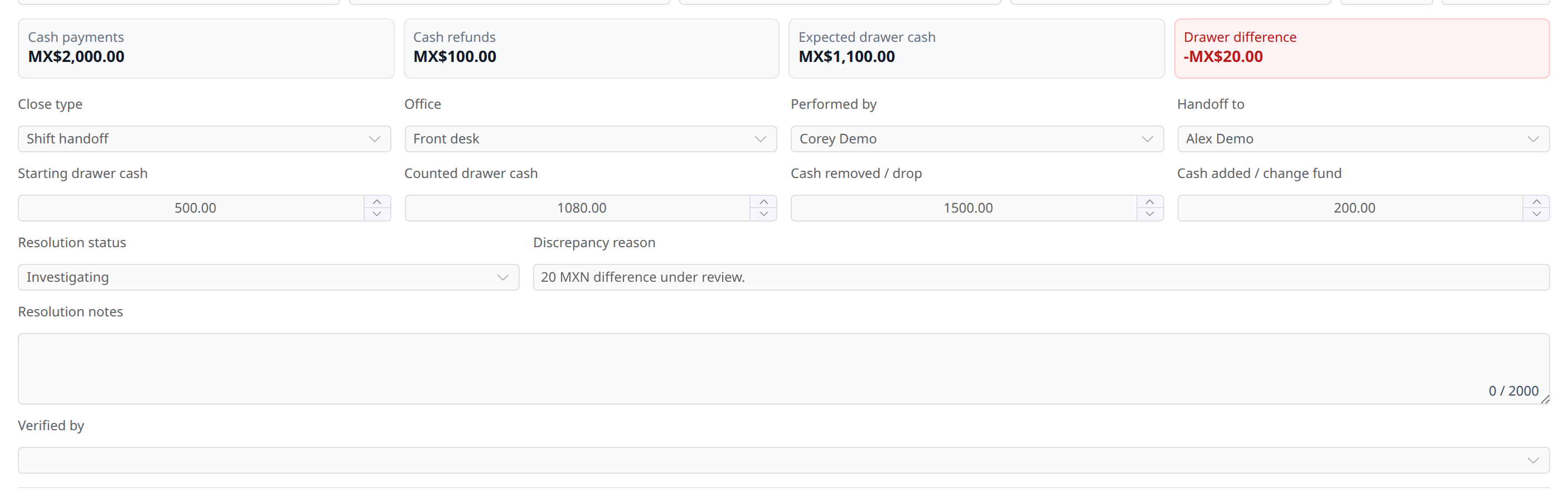
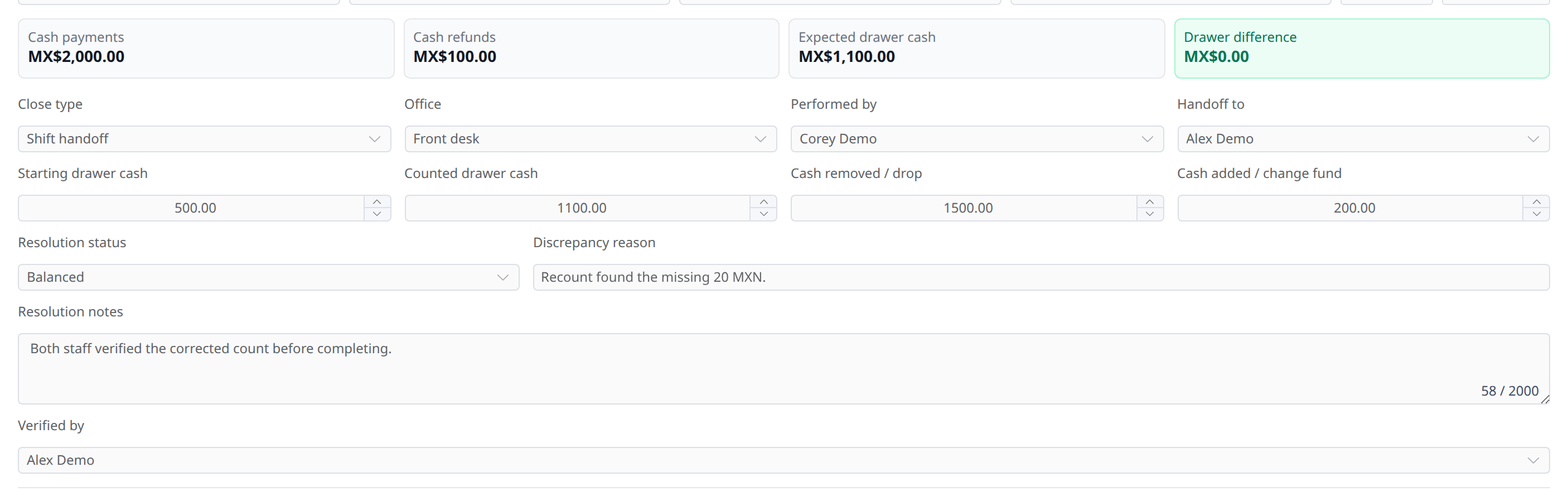
#The Demo drawer starts with 500 MXN, receives 2,000 in cash payments, gives 100 in cash refunds, drops 1,500 and receives 200 of added change. Expected cash is 1,100. A physical count of 1,080 gives a difference of -20.
A 900 MXN card payment stays outside expected drawer cash. Adding it to the cash total would create a false discrepancy. The team recounts and reviews evidence for the 20 MXN shortage, then records the actual finding or leaves a draft for the designated reviewer.
Change the numbers and check the result
Practice only · fictional examples. Does not change records or approve movements or payments. This simplified calculation excludes taxes, other movements and location allocations.
Avoid common mistakes
#- Choosing the calendar day when the real shift crosses midnight can omit transactions or mix two responsibilities.
- Treating a credit redemption as new cash collection makes cash reconciliation misleading.
- Creating another completed close over the same drawer period attempts to count activity twice; completed periods cannot overlap.
When something does not look right
#- If a close is blocked for overlap, inspect the existing completed close and drawer before changing times. Do not move the period to conceal shared activity.
- If totals differ, verify date/time boundaries, starting cash, cash methods, refunds, drops and added change before editing a payment.
- If a transaction was entered after the close was saved, compare the saved snapshot and current evidence. Ask the responsible manager how to document the correction instead of replacing historical records blindly.
Check your understanding
#Complete this lesson
#Saved only in this browser. This is a personal practice checklist, not a clinic training record.
Related guides
- Register Close workflow guide
- Record expenses and reconcile supplier balances
- Review attendance, compensation and payroll before creating expenses
- Public manual
Source: Register close and shift handoff · Revision 2