Build an inpatient plan and record the care actually given
Configure stay instructions, distinguish owner supplies, record administrations and condition checks, and prepare discharge.
Reviewed against current application source. Screenshots use fictional local training data.
Understand the workflow
#Hospitalization combines a planned stay with evidence of the care actually performed. Stay Instructions define repeated tasks; administrations record completed tasks. Quantity in an instruction is the amount used each time, not the total expected over the entire admission. Condition checks document the patient’s changing condition and support the next shift’s review.
Clinic-provided items, services, and owner-supplied items have different meanings. Food or medication brought by the owner belongs in the owner-supplied workflow rather than clinic stock sales. One-time charges remain separate from repeated instructions. During discharge, scheduled instruction quantities are derived from recorded administrations; do not manually replace those calculated rows to make the bill look complete.
Before you start
#- Create or open a Hospitalization appointment with the correct pet, assignee, admission date, and estimated Checkout date. Update the estimate when the expected stay changes.
- Move the appointment to Hospitalized when inpatient care begins. Stay instruction and administration controls are read-only outside the active Hospitalized stage, including Pending discharge and Done.
Do it in Übik
#- Open the hospitalization in Technician. Check dates, assigned staff, patient identity, and current stage before building the plan in Stay Instructions.
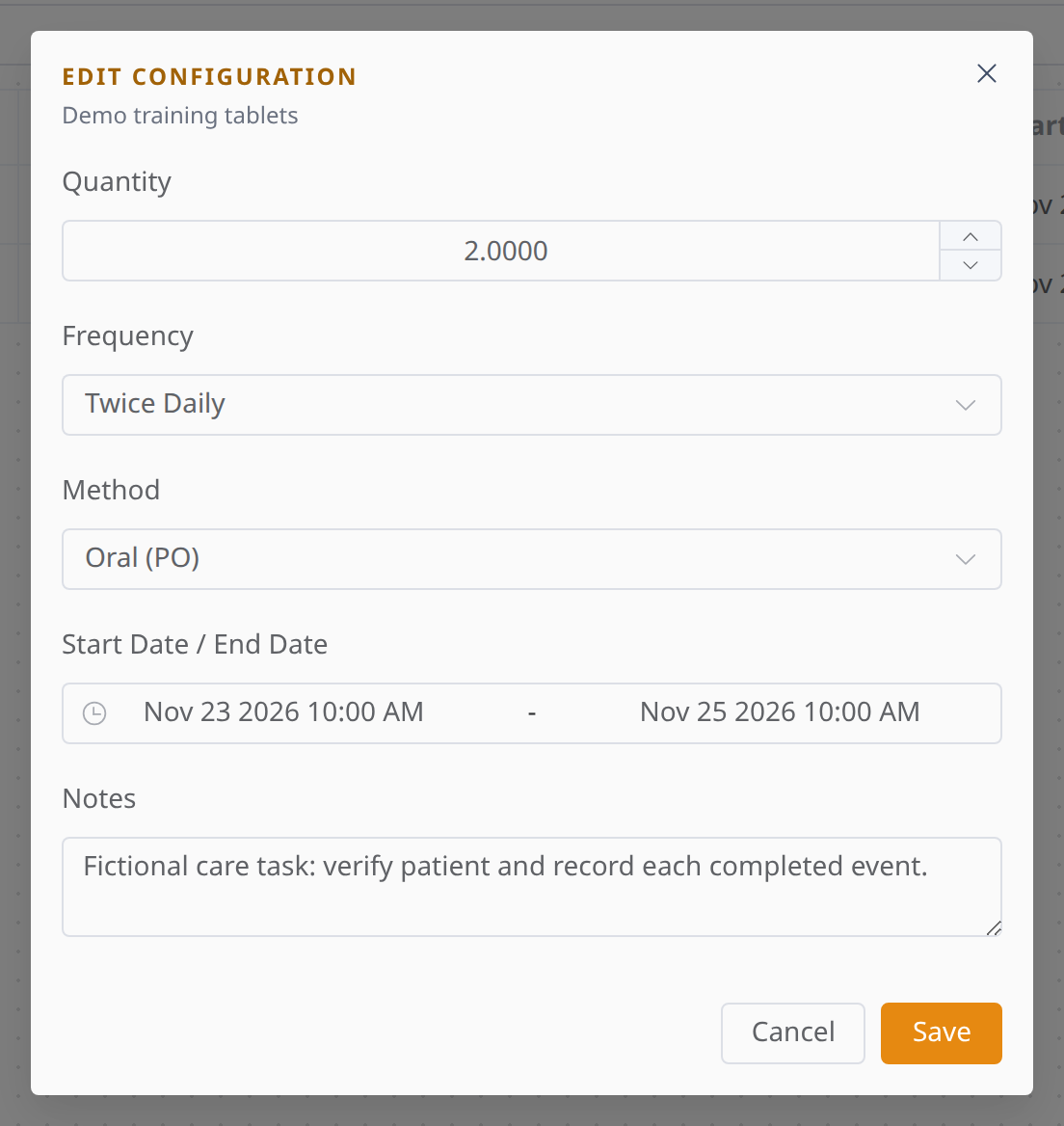
- Add the required product or service and complete its instruction configuration: Quantity per administration, Frequency, Method when applicable, Start date, End date, and Notes. Save and review the resulting row.
- For food or medicine brought from home, use Owner-supplied item. Review the name, category, received amount and unit, dose unit, storage, label verification, and notes as applicable.
- Use the stay timeline or administration control to record each completed task. Confirm the intended task, amount, and time; do not record care as completed merely because it is scheduled.
- Add condition checks with the relevant measured values, symptoms, notes, and documents. Review the recorded course and instruction adherence before handing over to the next shift.
- Record unrelated one-time products or services in Items, Services, and Charges. When the clinician approves discharge, review linked appointments and the calculated stay charges, prepare owner instructions, and hand off to Reception.
Try a fictional case
#Fictional patient Pipa has a two-day stay. A clinician-approved care instruction uses two training units each time, twice daily. Four completed administrations total eight units; the instruction quantity remains two. A missed administration must not be counted as completed to match the original plan.
The owner also brings labeled food. Staff record it as owner-supplied and check the storage instructions. At the shift handoff, they review completed tasks and the next due task together instead of relying on memory or a notification alone.

Avoid common mistakes
#- Entering the entire stay total as Quantity multiplies the amount at every administration. Confirm the amount per event before saving.
- Editing zero or not-dispensed instruction rows in the ordinary charge table can conflict with discharge calculations. Use recorded administrations as the source of the scheduled consumption.
- Deleting an instruction to erase a recording error removes useful context. Follow the existing authorized correction workflow and inspect the retained care history.
Troubleshoot the result
#- If instructions or administrations are locked, check the current stage. Hospitalized is the active stage; do not move a discharged patient back merely to bypass a needed correction review.
- If Checkout date changes, review the offered instruction-end-date update and select only the instructions that should change. Verify the schedule afterward.
- If administrations, stock consumption, or discharge quantities disagree, preserve the timeline and report the instruction, intended time, recorded time, and observed totals through Help before repeating an administration.
Check your understanding
#Complete the lesson
#Saved only in this browser. This is a personal practice checklist, not a clinic training record.
Related guides
- Hospitalization workflow guide
- Manage surgery from pre-op through recovery
- Manage boarding care, owner supplies, and pickup
- Public manual
Source: Build an inpatient plan and record the care actually given · Revision 2