Handle balances, customer credit, and refunds
Choose the correct path for an unpaid balance, unused deposit, existing credit return, or product refund, and verify the resulting records.
Reviewed against current application source. Screenshots use fictional local training data.
Understand the task
#An unpaid appointment balance, customer credit, unused appointment deposit, and returned purchase represent different situations. Start by finding the original record and identifying which situation applies. A minus sign or excess on a printed receipt does not automatically create a refund.
Returning existing customer credit records money leaving the clinic and reduces that credit balance. Converting an unused deposit to customer credit moves previously received money; it does not collect new money or return cash.
Before you start
#Use your clinic’s authorized payment/refund process and confirm customer, original payment, method, amount, and reason. Involve Accounting when the history is unclear or tax documents are involved. Do not use a refund to hide a charge error.
Use fictional arithmetic for practice. A recorded refund method documents the real transaction; the lesson does not promise that choosing a card method automatically sends money through an external provider.
Do it in Übik
#- For an unpaid balance, open the existing appointment or sale and review its saved charges and payments. Collect only the intended remaining amount through Pay.
- For an unused appointment deposit, open its payment flow and review Deposit remainder due. Choose Refund remainder or Convert to credit according to the agreed actual outcome.
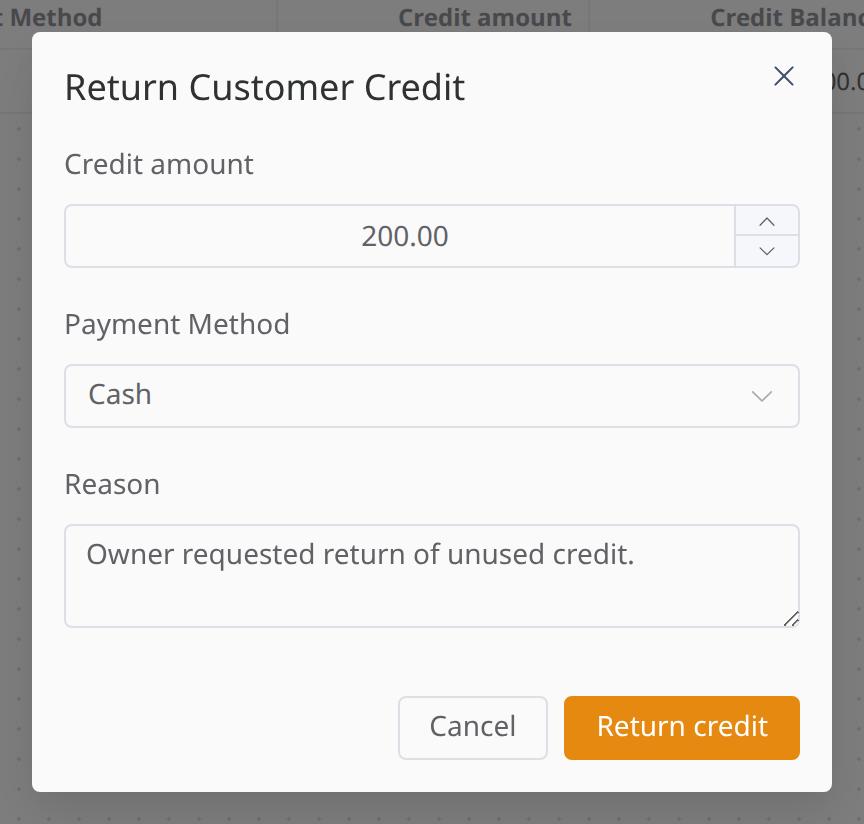
- For money returned from existing credit, open Customer profile → Credit → Return credit. Check the current available balance before entering an amount.
- Choose the real refund Payment method, any required card/debit Payment type, and a clear Reason. Confirm once and review the new credit-ledger row and balance.
- For a purchase return, start Reception → Refund Purchase, search the original customer/date range, open the original appointment/sale, and choose Refund on the intended charge. Review returned quantities, reason, and whether stock should return to inventory or stay deducted.
- Record whether money was actually refunded and its method. Save, then verify charge/return history, credit when relevant, and the financial record. Stop and ask Accounting about fiscal advances or unexplained differences.

Try a fictional clinic example
#A fictional MXN 2,000 cash deposit covers final charges of MXN 1,500. Moving MXN 500 to credit leaves the original MXN 2,000 cash receipt in its original shift and creates credit; it does not create a new cash payment or a cash refund.
Later the client has MXN 500 of available ordinary credit and requests MXN 200 back. Return credit records the actual MXN 200 refund and reduces available credit to MXN 300. If part is an invoiced fiscal advance, Accounting must review the supported fiscal path first.
Avoid these mistakes
#- Using Add credit when money is being returned increases the balance instead of reducing it.
- Changing original payment dates or adding a second payment to fix a mismatch damages the evidence.
- Returning a damaged product to usable stock merely because money was refunded makes inventory misleading. Review the actual disposition.
Troubleshoot and recover
#- If Return credit is disabled, review whether available credit is positive. The amount cannot exceed the current available ordinary balance; invoiced advances require separate review.
- After an interrupted refund save, review credit history, return quantities, and saved refund records before trying again. Escalate uncertainty with the original references, method, and amount.
- Compare Register Close against the period of the actual money movement. A later deposit-to-credit transfer does not rewrite the earlier cash close.
Check your understanding
#Check the result
#Saved only in this browser. This is a personal practice checklist, not a clinic training record.
Related guides
- Reception portal guide
- Complete checkout and deliver the correct receipt
- Send client documents and verify waiver completion
- Return a product from the original sale
- Public manual
Source: Return available customer credit · Revision 3