Review attendance, compensation and payroll before creating expenses
Configure the meaning of Pay Rate, resolve attendance exceptions and review the saved payroll decision.
Reviewed against current application source. Screenshots use fictional local training data.
What you will learn
#Payroll is an operational gross-payroll review. It combines salary, eligible commission, approved bonuses and deductions into a reviewed employee total before expenses are created. It does not replace tax calculation, statutory payroll documents or bank disbursement. Keep those responsibilities with the clinic’s established payroll process.
Pay interval defines the meaning of Pay Rate. Hourly pay uses completed hours; daily pay uses worked days from completed checks, counting the same day once; fixed salary uses the exact regular amount for the selected payroll run. Salary basis and Payment schedule describe the agreement and do not convert a monthly amount into a semi-monthly payment.
Before you start
#Use administrator access for compensation and payroll review. Confirm the approved employee agreements, payroll period and commission policies. Reconcile time checks with the actual attendance evidence rather than inferring pay from a planned shift alone.
Practice with fictional technician Sam and a training payroll period. Review any open time check, paid time off and unjustified absence before producing expenses. An already accounted payroll line is a saved decision; live source changes need careful review against that snapshot.
Follow the workflow
#- Open User Search, edit the employee and review Pay interval and Pay Rate. For Fixed salary, enter the exact regular amount for this run and document Salary basis, Payment schedule and any relevant Salary notes.
- Review Earns commission and the eligible catalog commission options. A single configured percentage can apply automatically; multiple approved options require a choice during payroll review.
- Open Accounting > Payroll and select the intended date range. Inspect salary and attendance status, including completed hours/days, open time checks, paid time off and unjustified absences.
- Correct open time checks through attendance review before expensing. Paid time off is paid context; an unjustified absence requires an administrator’s explicit deduction amount and reason before reducing the total.
- Review commission attribution, required rates, bonuses and deductions. Inspect any helper formula before accepting it; helper rates and amounts are clinic decisions rather than an automatic legal determination.
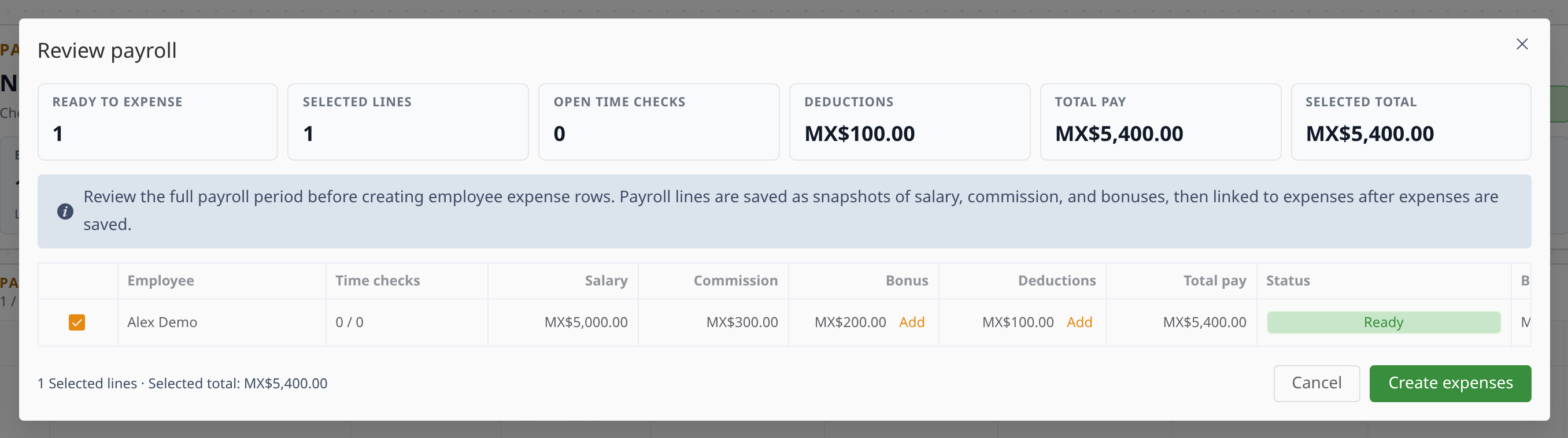
- Check salary plus commission plus bonuses minus deductions for each employee. Create expenses only after the line is ready, then inspect the linked expense and saved payroll line instead of recreating the same run.

Practice with a fictional clinic
#Sam has a fixed regular amount of 5,000 MXN for the selected run, 300 commission, an approved 200 bonus and a confirmed 100 deduction. The reviewed total is 5,400. Selecting Monthly as salary basis does not split that 5,000 again.
For an hourly colleague, a work schedule with no completed time check does not automatically create salary. If a check remains open, review and correct attendance first. Do not invent a deduction or duplicate the payroll expense to bypass the warning.
Avoid common mistakes
#- Entering the monthly salary as Pay Rate when the intended run amount is half that value overstates fixed-salary payroll.
- Assuming schedules automatically create hourly pay or that unjustified absences silently deduct pay bypasses required review.
- Editing employee settings after a run and expecting the accounted snapshot to rewrite itself obscures the original decision.
When something does not look right
#- If expensing is blocked, inspect open time checks, required commission options and unresolved deduction confirmation.
- If commission differs, review the credited employee, eligible charge, basis and selected option before changing the employee’s compensation agreement.
- If an accounted line or linked expense needs correction, compare the saved snapshot with current evidence and ask the responsible payroll administrator to choose the appropriate correction; do not create another run blindly.
Check your understanding
#Complete this lesson
#Saved only in this browser. This is a personal practice checklist, not a clinic training record.
Related guides
- Employee payroll configuration guide
- Close the register and hand over the drawer
- Use reports for a focused daily clinic review
- Public manual
Source: Set commission options for payroll · Revision 2