Manage surgery from pre-op through recovery
Use surgery stages, repeated intra-op reports, linked work, and a clear discharge handoff.
Reviewed against current application source. Screenshots use fictional local training data.
Understand the workflow
#A Surgery appointment uses a dedicated stage sequence in the current Technician workspace: Waiting, Pre-op, Surgery, Post-op, optional Pending discharge, and Payment. Keep the stage aligned with the patient’s actual movement so Reception and the care team can distinguish preparation, procedure, recovery, and checkout needs.
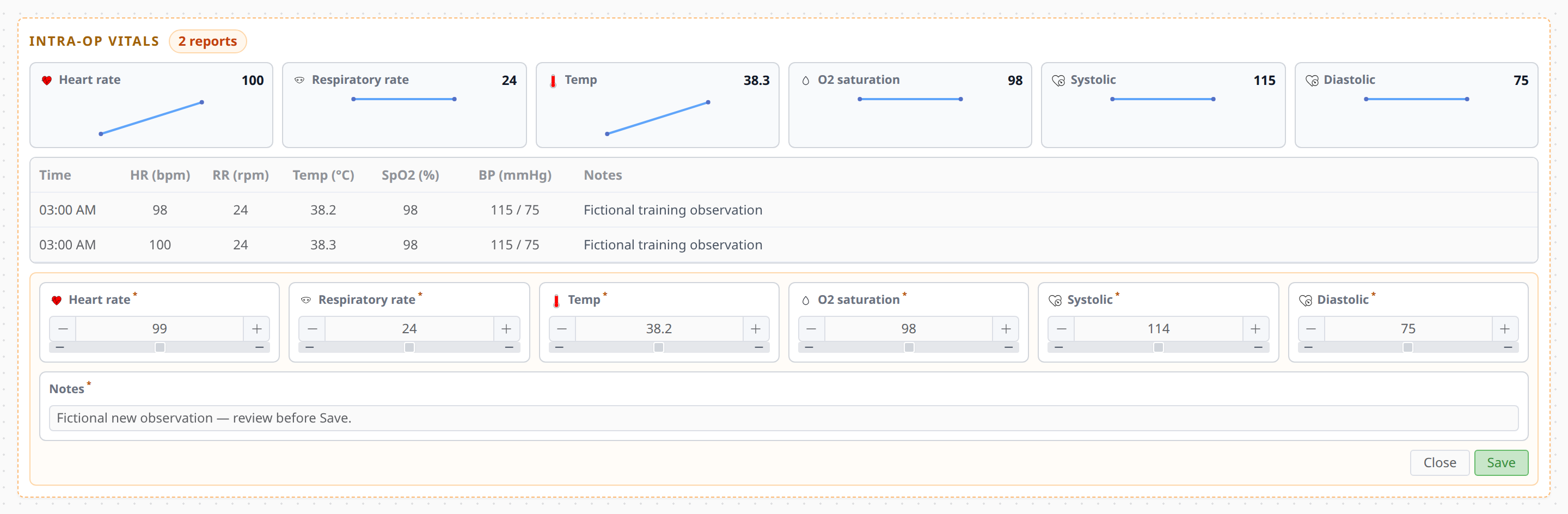
Intra-op vitals is a time-based series of saved reports, not the standard consultation vitals grid. Each report can include heart rate, respiratory rate, temperature, oxygen saturation, systolic and diastolic pressure, and notes. The latest cards and trend charts help review the saved series; they do not replace the clinic’s monitoring protocol or clinician judgment.
Before you start
#- Confirm the patient, Surgery appointment type, date, assignee, and planned procedure. Review intake, consent, documents, and the clinician’s preparation requirements.
- Identify who records observations and who accepts the handoff at each stage. Use an open appointment with the appropriate permissions; completed records are protected.
Do it in Übik
#- Open the Surgery appointment in Technician. Use the top workflow to move to Pre-op when preparation begins, and verify the patient, notes, forms, and required documents.
- Use the appointment print menu for pre-op labels when your clinic needs patient or crate identification. Check the printed patient identity before attaching a label.
- Move to Surgery when the procedure begins. In Intra-op vitals, choose Add report, enter the measured values and relevant notes, then Save the report.
- Record additional reports at the intervals required by the responsible clinician. Check the saved time rows, latest values, and trends; distinguish an unsaved open form from a saved report.
- Use linked appointments for related laboratory work, hospitalization, or follow-up when needed. Review Products, Services, and Charges so the medical record and bill reflect the actual work.
- Move to Post-op during recovery. Prepare Notes to customer, prescriptions, and any discharge documents. Use Pending discharge when owner pickup remains, then hand over to Reception for charge review and payment.
Try a fictional case
#Fictional patient Sol arrives for a planned procedure. The team confirms identity in Pre-op, records separate observations during Surgery, and updates the status to Post-op when recovery begins. Each saved observation retains its own time and notes.
A linked laboratory appointment remains outstanding. Before asking Reception to check out the case, the clinician verifies whether the lab work is complete and explains what remains. The training case uses invented documentation and does not define a real anesthetic monitoring schedule.

Avoid common mistakes
#- Leaving the appointment in Surgery throughout recovery makes the queue misleading. Update the stage when the patient moves into Post-op.
- Entering one final value as a substitute for the entire monitoring series loses the sequence of observations. Record reports according to the clinic’s actual protocol.
- Creating unrelated appointments for required testing makes the discharge relationship harder to follow. Use the linked workflow when the cases belong together.
Troubleshoot the result
#- If Pre-op or Intra-op vitals is absent, check the appointment type and that you opened the current Technician workspace.
- If Add report is unavailable, check whether the appointment is Done. If a report is still open, save and verify it before assuming it was recorded.
- If a saved report, timestamp, or linked charge is incorrect, retain the existing evidence and ask an authorized colleague or Help to review the correction; do not replace history with guessed observations.
Check your understanding
#Complete the lesson
#Saved only in this browser. This is a personal practice checklist, not a clinic training record.
Related guides
- Surgery workflow guide
- Document imaging studies and attach the right evidence
- Build an inpatient plan and record the care actually given
- Public manual
Source: Manage surgery from pre-op through recovery · Revision 2