Prepare discharge documents and the next care step
Review owner instructions, linked work, documents, and follow-up before handing a completed case to Reception.
Reviewed against current application source. Screenshots use fictional local training data.
Understand the workflow
#Discharge is a clinical and operational handoff: the owner needs understandable instructions, the next care step must be clear, and Reception needs the correct charges and documents. Pending discharge is useful when clinical care is ready but pickup or checkout is outstanding. Payment, patient departure, and a completed protected chart are separate facts to confirm.
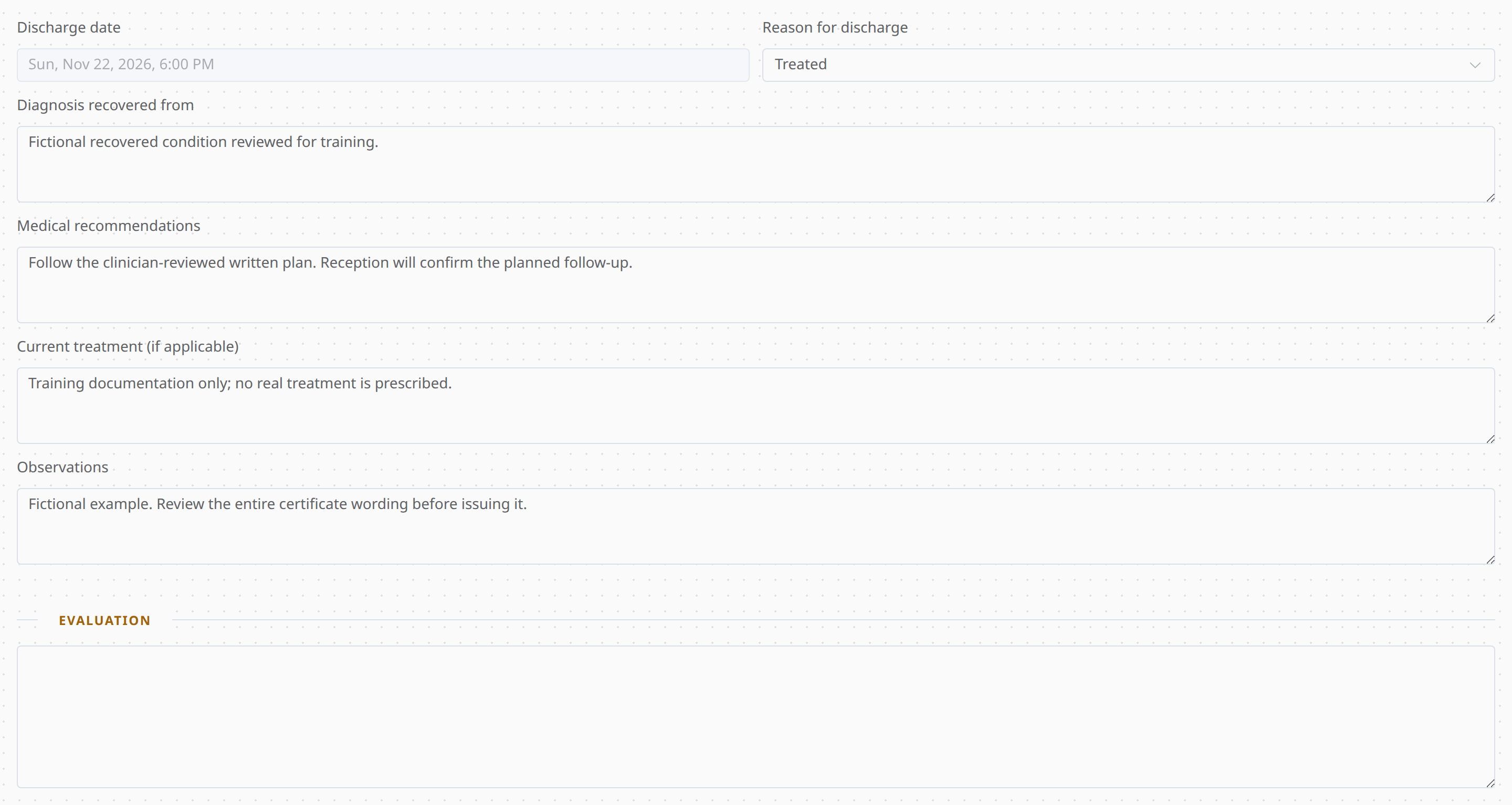
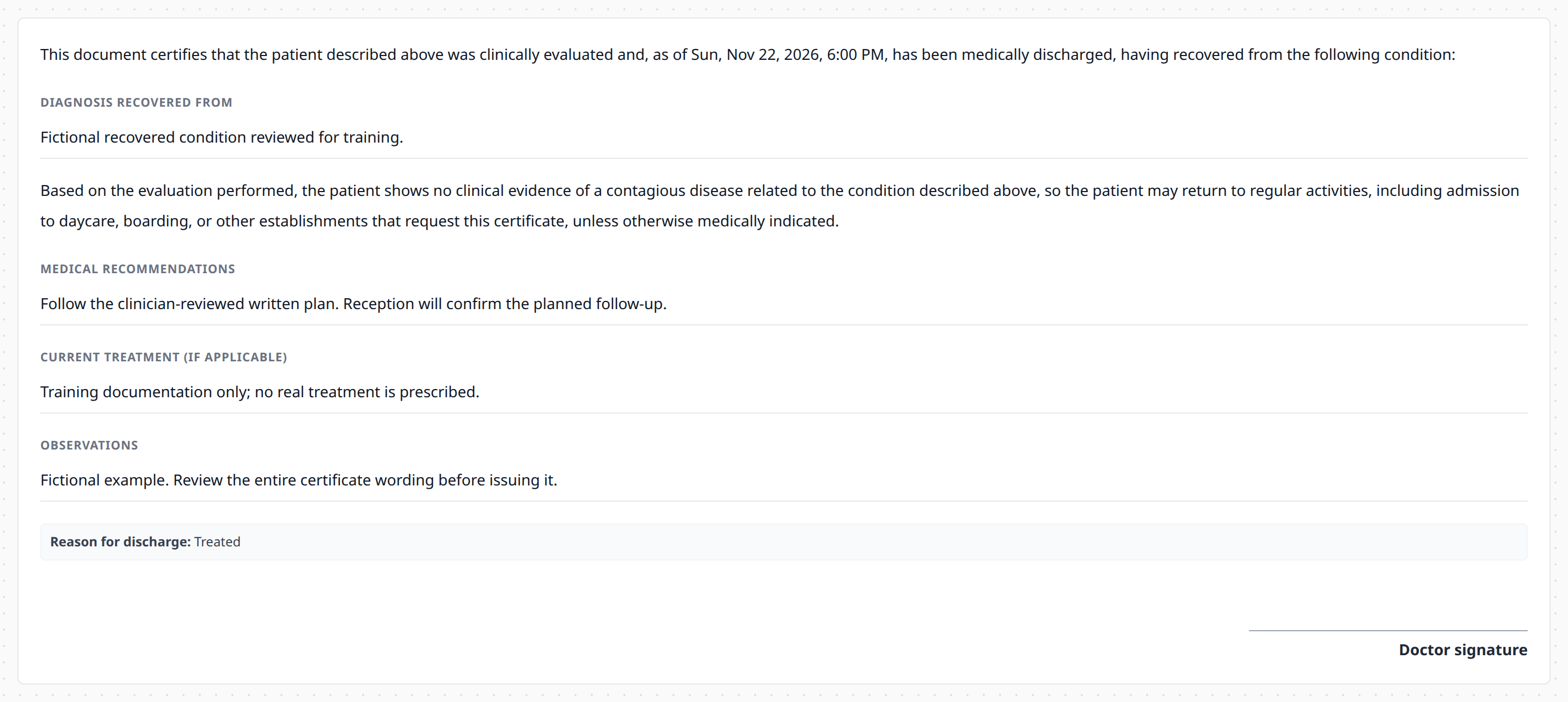
A Discharge Certificate is one available supplemental document, not a universal replacement for every discharge summary. Its standard wording includes recovery and contagious-disease statements. Use it only when the complete text truthfully describes the case. Choosing a reason such as transfer or leaving against advice does not make incompatible certificate wording clinically appropriate.
Before you start
#- Ask the responsible clinician to confirm that the patient is ready for the planned handoff. Review outstanding tests, linked appointments, owner instructions, and medications or belongings to be returned.
- Check that the correct owner contact and communication route are available. Read any document preview completely before printing or sharing; private staff notes are not the owner’s discharge instructions.
Do it in Übik
#- Review the chart and write clear Notes to customer: the approved care instructions, next action, and follow-up plan. Confirm that the text saved and use Preview to review the owner-facing result.
- Review prescription and clinical report documents from the appointment’s print or sharing actions. Confirm the patient and the exact report rather than reusing an old message link.
- If a Discharge Certificate is appropriate, add it under Supplemental forms. Review the discharge reason, recovered diagnosis, recommendations, current treatment, observations, and the full certificate preview. Save before sharing.
- For stays and linked work, open Discharge and review the related appointment rows, statuses, assignees, and Needs payment information. Select the appropriate work for payment rather than assuming every linked appointment is ready.
- If Patient leaving now is offered, choose it only when the patient is actually leaving. Review the resulting workflow instead of using the option to hide ongoing care.
- Review Follow Ups and any internal suggestions. Check whether the next service is already completed or booked, agree the next action with Reception, and confirm who communicates it to the owner.
Try a fictional case
#Fictional patient Moka is ready for pickup after a stay and has a linked laboratory appointment. The clinician completes the owner instructions and reviews the lab report. Reception sees both records in the discharge review and checks which charges should proceed.
A transfer is the chosen disposition, but the standard certificate says the patient recovered. The clinician does not issue a document with an untrue statement; the team uses the appropriate reviewed clinical documentation and confirms the next clinic’s handoff instead.
Avoid common mistakes
#- Marking every related appointment payable without checking clinical readiness can obscure unfinished work. Review each row.
- Sending an old sample or form-completion link instead of the reviewed report can send the owner to the wrong destination. Generate a fresh share from the correct document.
- Assuming a suggested follow-up is already booked leaves a gap. Verify the actual appointment and responsible person.
Troubleshoot the result
#- If the expected linked appointment is missing, confirm the relationship and patient before starting another appointment or payment.
- If a report cannot be sent, verify the current document, contact details, reachability, and enabled communication mode. Keep the saved medical report while resolving delivery.
- If discharge status, calculated charges, or a fresh report link remains wrong, stop repeating the action and report the affected appointment, document, and observed result through Help.
Check your understanding
#Complete the lesson
#Saved only in this browser. This is a personal practice checklist, not a clinic training record.
Related guides
- Configure treatment schedules and review actual adherence
- Manage boarding care, owner supplies, and pickup
- Public manual
Source: Prepare discharge documents and the next care step · Revision 2