Why inventory groups matter and which categories to use
An Inventory Group is a named family of related items. A specific inventory item remains the presentation you count, purchase and dispense. Type is one of eight fixed classifications; Tags are searchable labels. Decide these separately so staff can find the intended product without duplicating records.
Reviewed against current application source. Screenshots use fictional local training data.
Groups, Types and Tags have different jobs
#An Inventory Group is a named family of related items. A specific inventory item remains the presentation you count, purchase and dispense. Type is one of eight fixed classifications; Tags are searchable labels. Decide these separately so staff can find the intended product without duplicating records.
Before you start
#Agree names and classification with clinical and inventory staff. Search existing groups by Name or Tags before adding one. You need Data view/add/edit permissions for group maintenance and inventory edit permission to link an item.
Why are groups important?
#- Clinical search can find a group, then show its enabled inventory variants for staff to choose the exact item. Linking items does not assert clinical substitutability.
- Services can associate a group or specific items; a preferred variant can be configured where applicable. A group association still requires reviewing the intended presentation.
- Product Performance offers group, item and Type views. Group reporting uses the group name, so consistent names matter and duplicate names can hide separate records in one report row.
- Stock, lots, prices, purchase conversions and replenishment remain per inventory item. A group does not pool stock or merge duplicates.
Which categories should we use?
#Use Type for a broad classification and a group for a recognizable, narrow product family. The examples below are suggested clinic conventions, not enforced clinical definitions. Confirm the right classification locally.
| Actual Type | Suggested use |
|---|---|
| Medicine | Medicines grouped by ingredient, strength and form |
| Merchandise | Retail products, such as a named maintenance diet with separate bag sizes |
| Diagnostics | Diagnostic products or materials under the clinic convention |
| Solution | Solutions, distinguishing composition/concentration |
| Diluent | Diluents with clearly identified compatibility/presentation |
| Accessory | Recovery collars, with separate sizes |
| Supplies | Sterile syringes · 3 mL; examination gloves with separate sizes |
| Medical equipment | Equipment or instruments according to clinic catalog policy |
Vaccine is a separate group switch, not a ninth Type. Tags such as refrigerated or consumable can cross categories without creating duplicate products.
Create the group
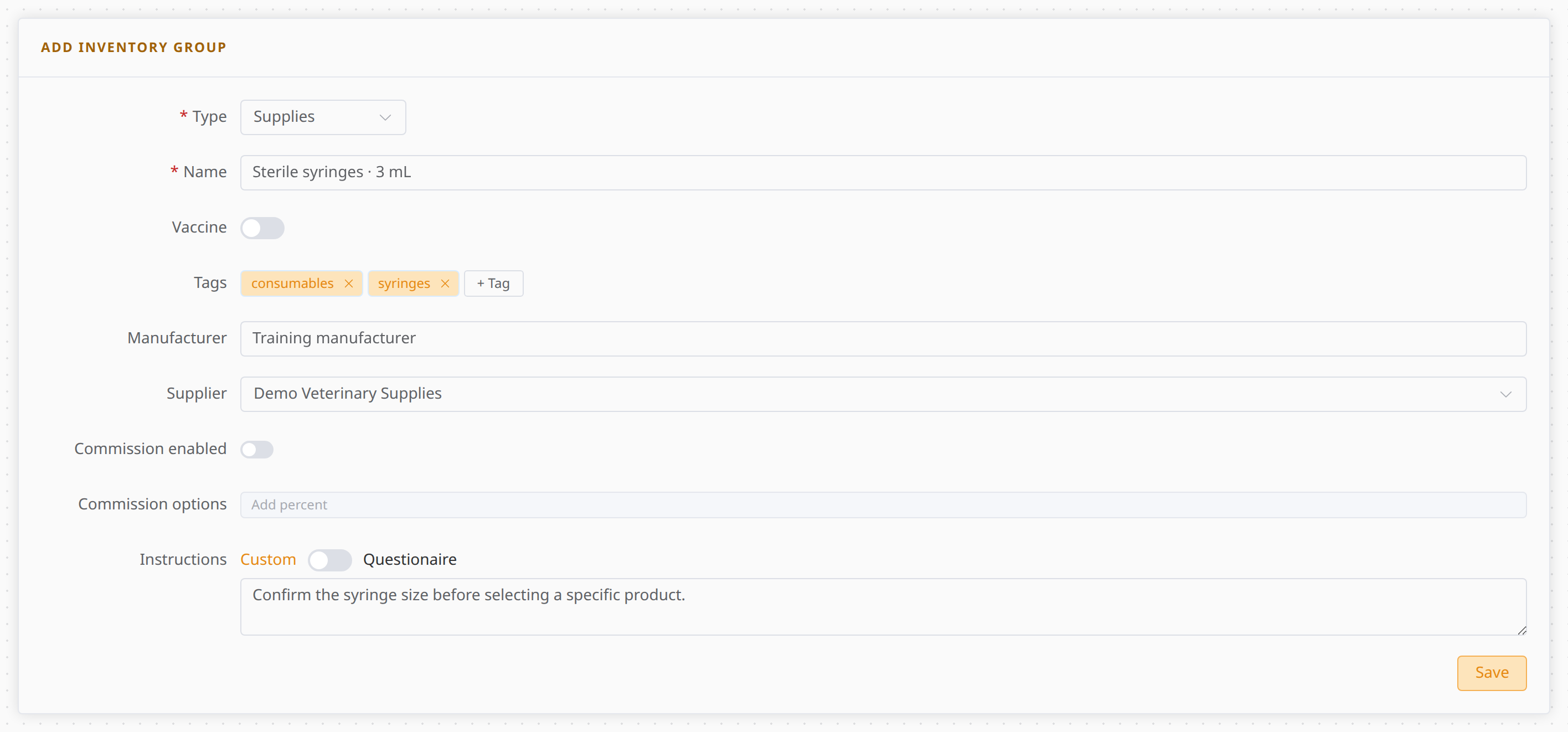
#- Open Data → Inventory Group. Search first, then choose Add or Edit the intended group.
- Enter Name and Type, which are required. Use a specific family such as Sterile syringes · 3 mL. Add Manufacturer, Tags and other group information only when appropriate.
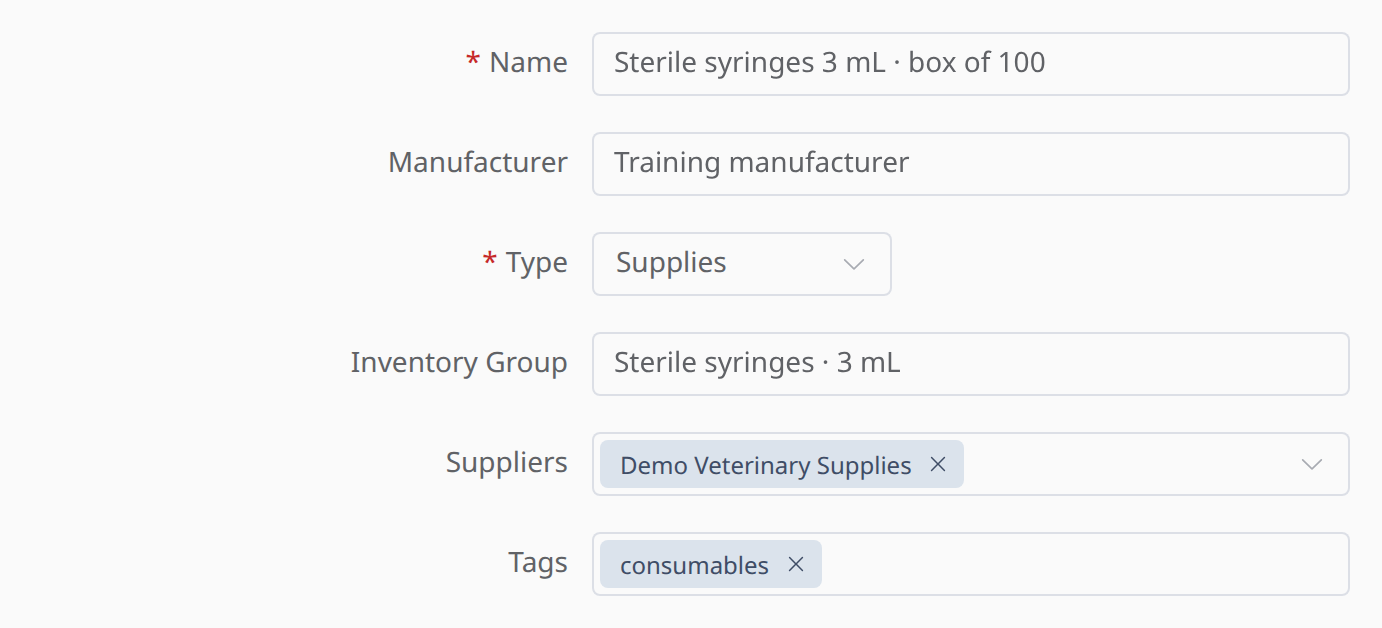
- Save the group, then open Inventory → Manage and edit each intended inventory item. Choose the saved Inventory Group and review that item’s Name, Manufacturer, Type and Suppliers before saving.
Link presentations without changing their meaning
#Selecting a group only fills an item’s Name and Manufacturer when those fields are blank. It does not copy all group settings. Configure the item’s Suppliers separately; the group’s supplier field is not a substitute for item supplier links used in purchasing.
The picker permits different group/item Types. Review this deliberately: the group Type can affect new clinical dispense charges. Do not treat a group change as a harmless label edit if clinical items already depend on it.
Try a grouping decision
#A fictional clinic has nitrile examination gloves in small, medium and large. One group named Nitrile examination gloves can help staff find the family; each size stays a separate inventory item with its own barcode, quantity, package size and price. Search the group and verify that the size choice remains clear. Do this in a training clinic before changing the live catalog.
Common mistakes
#- One broad All medicines group hides the ingredient, concentration or form staff need to choose safely.
- Creating Food or Vaccine as if it were a fixed Type; use the actual Type choices and appropriate group details.
- Expecting linked presentations to share quantity, supplier links or purchase conversion automatically.
If a group or item is missing
#Check the clinic, permissions, search text and enabled item variants. Confirm the item actually links to the saved group. A duplicate group name is not proof it is the same group record. If a live regrouping would change clinical selection, charges or historical interpretation, review it with the clinical/Inventory Lead; preserve the original item and History rather than merging records by guesswork.
Check your understanding
#Ready to organize the catalog
#Saved only in this browser. This is a personal practice checklist, not a clinic training record.
Related guides
- Create and maintain the inventory catalog
- Quantity and automatic packages
- Supplier-to-Übik conversion
- Review purchase orders
- Public manual
Source: Why inventory groups matter and which categories to use · Revision 2